
Hope everybody had a great week!
This week is about keeping what’s yours. First, two Claude settings that show you every chat you’ve ever shared, so nothing private stays out there. Then seven short ChatGPT codes that help you learn anything faster, and a prompt for the next time your keys go missing.
Let’s get into it.
- Are Your Claude Chats on Google? Check These 2 Settings
- 7 ChatGPT Codes to Learn Anything Fast
- I Want to Know What You Think
- Prompt of the Week: ChatGPT Can Find What You Lost
- Jeff Bezos Wants to Run AI From Space
- A $29,990 Tesla With No Steering Wheel
- Tool of the Week: A Home for the Book You Want to Write
- 17 Claude features most people never open
- Turn Claude into your content team
🔒 Start here
Are Your Claude Chats on Google? Check These 2 Settings

Think about what you’ve told Claude. Your health, your money, your work, your family.
Your chats are private unless you clicked Share. Sharing turns a chat into a link, and anyone who has that link can read it. Here’s the catch: the link stays live long after you’ve forgotten you made it. In July, hundreds of shared Claude chats, and things Claude had built in them, showed up in Google and Bing search results. Google cleared them out within days, and chats nobody shared were never part of it.
A link you made stays out there until you take it down, though. That part takes about two minutes:
-
Open Claude on your computer and click your name in the bottom left corner.
-
Choose Settings, then Privacy.
-
Next to Shared chats, click Manage. Click the trash can next to any chat you don’t want out there, and that link stops working.
-
Do the same next to Shared artifacts. Those are the documents, charts, and little apps Claude built for you.
Nothing gets deleted on your side. The chat stays in your history exactly as it was. The guide shows every click, plus what people can and can’t see the next time you do share one.
Keep Your Claude Chats to Yourself →
📚 Learn anything
7 ChatGPT Codes to Learn Anything Fast
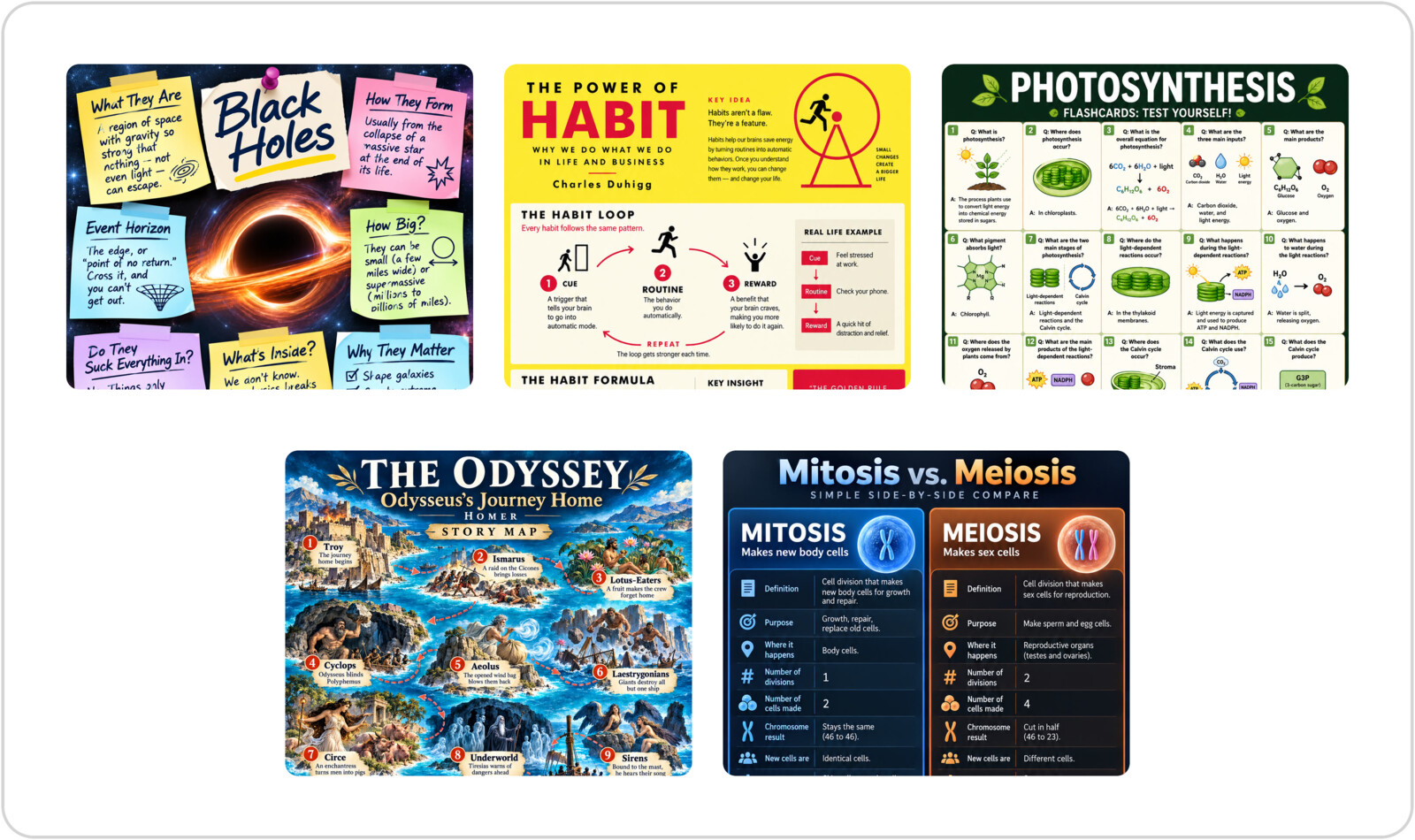
A class, a new job, a book you’ve been meaning to finish, or something you’ve always been curious about. Type one short code into ChatGPT, add what you want to learn, and it does the sorting for you.
-
/sticky notes boils any topic down to one page of notes, like black holes
-
/coreconcepts pulls the big ideas out of a book, so you get the lessons in minutes instead of weeks
-
/socrates stops handing you answers and asks you questions until you really get it
-
/flashcards makes a set of flashcards so you can test yourself
-
ELI5 explains anything like you’re five, so the confusing stuff finally makes sense
-
/storymap maps out a book’s whole story, so you never lose track of who’s who
-
/compare puts two things you keep mixing up side by side
Put your topic right after the code, like /flashcards photosynthesis. For the two book codes, name the book first. The guide has all seven with examples, plus 18 more for whatever you’re learning next.
Learn Anything Faster With ChatGPT →
🙋 One quick question
I Want to Know What You Think
I’m planning what I teach next, and I want it to be the thing you’d use the most. Tap one. It takes two seconds.
None of these sound like you? Tap Something else and tell me what you’d want instead. You can also just hit reply.
If I showed you how to build one of these with AI, step by step, which would you pick?
-
My own website, with no coding
-
An AI assistant that works for me every morning
-
A side income I can start with AI
-
A week of content made in one hour
-
An AI that knows my work and writes like me
-
Something else
💬 Prompt of the Week
ChatGPT Can Find What You Lost

Keys, glasses, your wallet. You had it an hour ago, and now you’re tearing the house apart. Before you flip the couch cushions again, let ChatGPT walk you back through your day. It asks you one question at a time, the way a calm friend would, and then tells you where to look first.
Paste this into ChatGPT and fill in the brackets.
Help me find something I lost. It's [what it is]. The last time I remember having it was [when and where].

Ask me questions one at a time to help me retrace my steps: where I went, what I was doing, what I was carrying, and where I usually set things down. Wait for my answer before you ask the next one.

After a few questions, give me a short list of the places I should check, with the most likely place first.
Dropped something small, like an earring back or an earbud? ChatGPT can spot it in a photo. That one’s in the guide, along with prompts that track down money you forgot you had, an old 401(k) from a job you left years ago, and a pet that slipped out the door.
Find What You Lost With ChatGPT →
💫 Interesting AI news
Jeff Bezos Wants to Run AI From Space

AI runs on giant data centers, and those buildings use a huge amount of electricity and water. Jeff Bezos’s rocket company, Blue Origin, has a different idea: put the data centers in orbit.
Blue Origin has asked the U.S. government for permission to launch more than 50,000 satellites that would work together as one data center in space. The plan is called Project Sunrise. Up there the sun’s power is free, and it would take pressure off the towns and water supplies that data centers lean on now. SpaceX, Google, and a startup called Starcloud are all chasing the same idea.
Don’t look up yet. It still needs approval, and experts say projects like this are unlikely to be up and running before the 2030s. Read the full story
A $29,990 Tesla With No Steering Wheel

Tesla has started inviting a small group of customers to buy a Cybercab of their own. It’s a two-seat electric car with no steering wheel and no pedals. You don’t drive it. It drives you.
The reported price is $29,990, and that’s not the whole bill. The car needs a $299-a-month subscription to run at all, and it only drives itself inside the areas where Tesla’s Robotaxi service already works. The first deliveries are expected in Texas in December. Even Elon Musk has said the monthly fee is too high. Read the full story
Would you buy a car you can’t drive? Hit reply and tell me. I really want to know.
🧰 Tools worth a look
Tool of the Week: A Home for the Book You Want to Write

If there’s a novel in you, the hard part is keeping track of it all: who’s who, what happened when, and that note you scribbled about chapter nine. The Novelist is a writing app built for fiction. You write your chapters in it, and it keeps a story bible beside them with your characters, places, and events, so everything about your book lives in one spot.
My favorite part: your book stays on your own computer. There’s no account to make, and nothing gets uploaded. You can even preview your pages the way they’d look in print or on a Kindle.
It’s a new app for Mac, Windows, and Linux. Writing in it is free, with no trial and no limit on books or chapters. The Pro version starts at €39.99 a year and adds AI feedback on your manuscript, grammar checks, and ebook export.
⚡ In case you missed it
Two More Guides From This Week
1. 17 Claude features most people never open. A designer for your flyers, a budget calculator built in a minute, your to-do list waiting every morning, and a mentor who tells you the truth about your plan. Most of them work on the free plan.
Get more out of the Claude you already have →
2. Turn Claude into your content team. Five plugins: one learns how you sound, one shows you what’s working for other accounts, one plans your week, one makes your writing sound human, and one schedules your posts.
Put Claude to work on your content →
💛 That’s a wrap
Go Try One Today
Check your two Claude settings, try one learning code on something you’ve always wanted to understand, and save the lost-and-found prompt for the next time your keys walk off. Pick one and try it today.
Know someone who tells Claude everything? Forward this so their old shared chats don’t stay out there.
Hit reply and tell me which one you tried.
See you next week, Kelly