
How to Keep Your Claude Chats Off Google: Check These Two Settings
Take back every Claude chat and artifact you've ever shared, in about two minutes. The exact clicks to see what's public on your account, unshare it, and keep your private conversations from ending up on Google.
Save it, print it, read it offline. It's yours.
You’ve probably told Claude things you wouldn’t say out loud at dinner. Your health, your money, your work, your family. Here’s how to make sure those chats stay yours. In about two minutes you’ll see every chat and every artifact you’ve ever shared, take down the ones you don’t want out there, and know exactly what happens the next time you click Share.
A shared Claude chat is a conversation you turned into a link by clicking Share. Anyone who has the link can read it, and in July 2026 some of those links showed up in Google. You can see all of yours in Settings under Privacy and unshare them with one click each.
Claude on any plan, open on your computer at claude.ai or in the desktop app. The steps are the same in both. On a Team or Enterprise plan through work, shared chats only open for people in your organization.
Yes, unless you shared them. A Claude chat is only visible to you until you click Share on it. Sharing makes a link, and anyone with that link can open the chat.
People share chats all day long, with a loved one, a coworker, or whoever needs to see what Claude came up with. That’s what the Share button is for. The catch is that the link stays live long after you’ve forgotten about it, and in July 2026 hundreds of those shared chats, and things Claude had built inside them, turned up in search results.
Google cleared them out within days, and chats nobody shared were never part of it. But a link you made stays live until you take it down. That’s the part you can fix today.
Claude takes a picture in time of your conversation and gives it a web address. Anyone who has that address can read everything in the chat up to that moment, including anything Claude built for you in it.
Here’s what is and isn’t in that link, from Claude’s own help center:
| In the shared link? | |
|---|---|
| Every message before you shared | Yes |
| Artifacts Claude made in the chat | Yes |
| Messages you send after sharing | No, those stay private |
| Files you uploaded | No, the file stays private |
Most of us share a chat once, to show a friend or a coworker, and forget the link exists. If that link gets posted or passed along, it can travel a lot further than the one person you sent it to.
Open Claude on your computer, go to Settings, then Privacy, and click Manage next to Shared chats. That page lists every chat you’ve ever shared. Click the trash can next to one and its link stops working right away. Here it is click by click:
- Click your name in the bottom left corner, then Settings.
- Click Privacy in the menu on the left.
- Scroll down to Your data. Next to Shared chats, click Manage.
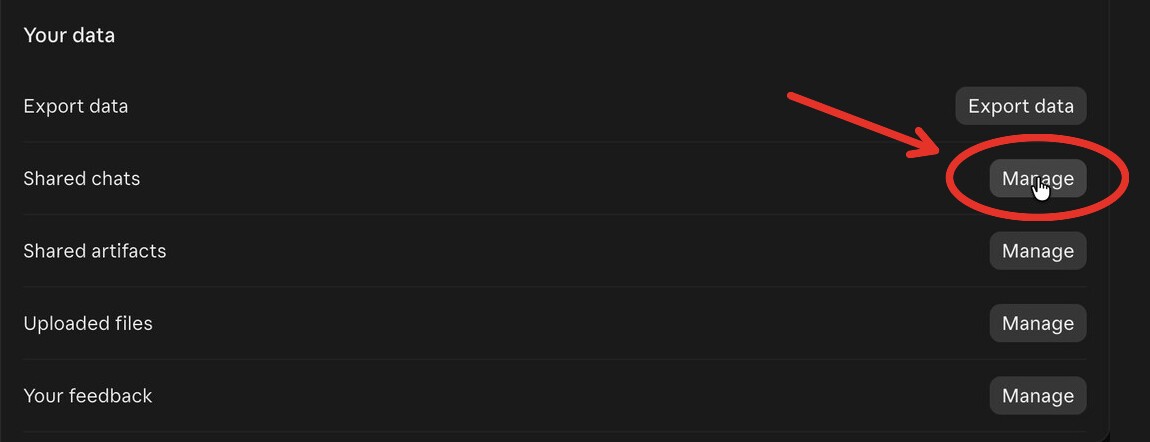
- Read down the list. Each row shows the chat’s name, the date you shared it, and “Anyone with the link.”
- Click the trash can under Unshare next to any chat you want back. That link is dead.
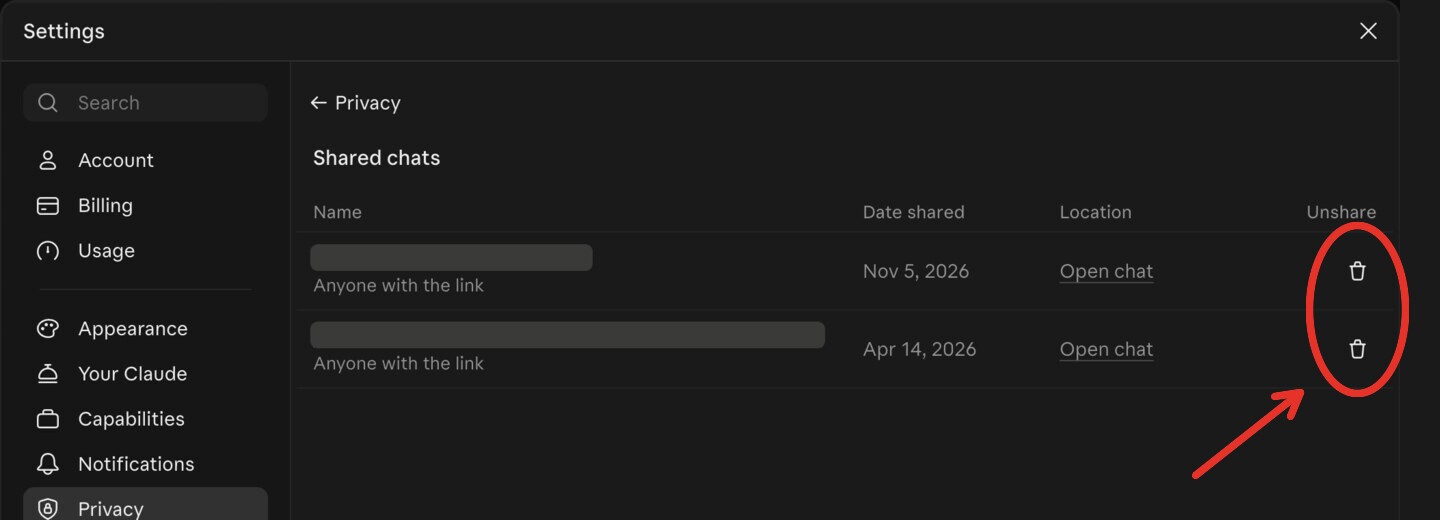
Unsharing only turns off the link. The chat itself stays in your history, so you don’t lose anything. Not sure which chat a row is? Click Open chat to read it before you decide.
This is the half most people skip. An artifact is anything Claude built for you, like a document, a chart, or a little app. When you share one it gets its own link and its own list, and anyone with that link can open it without a Claude account.
- Go back to Settings, then Privacy.
- Next to Shared artifacts, click Manage.
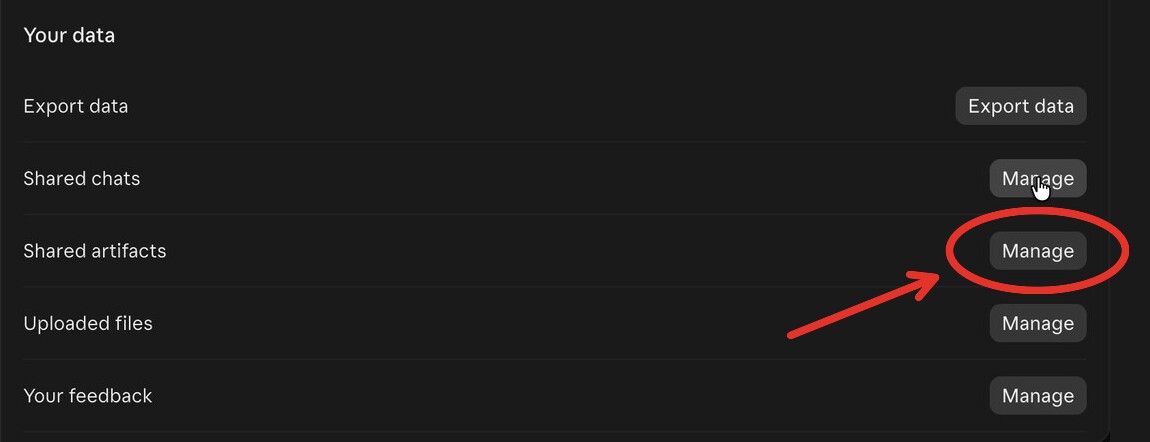
- The top list, Shared artifacts, is everything you’ve published. Click the trash can under Unpublish on anything you don’t want out there.
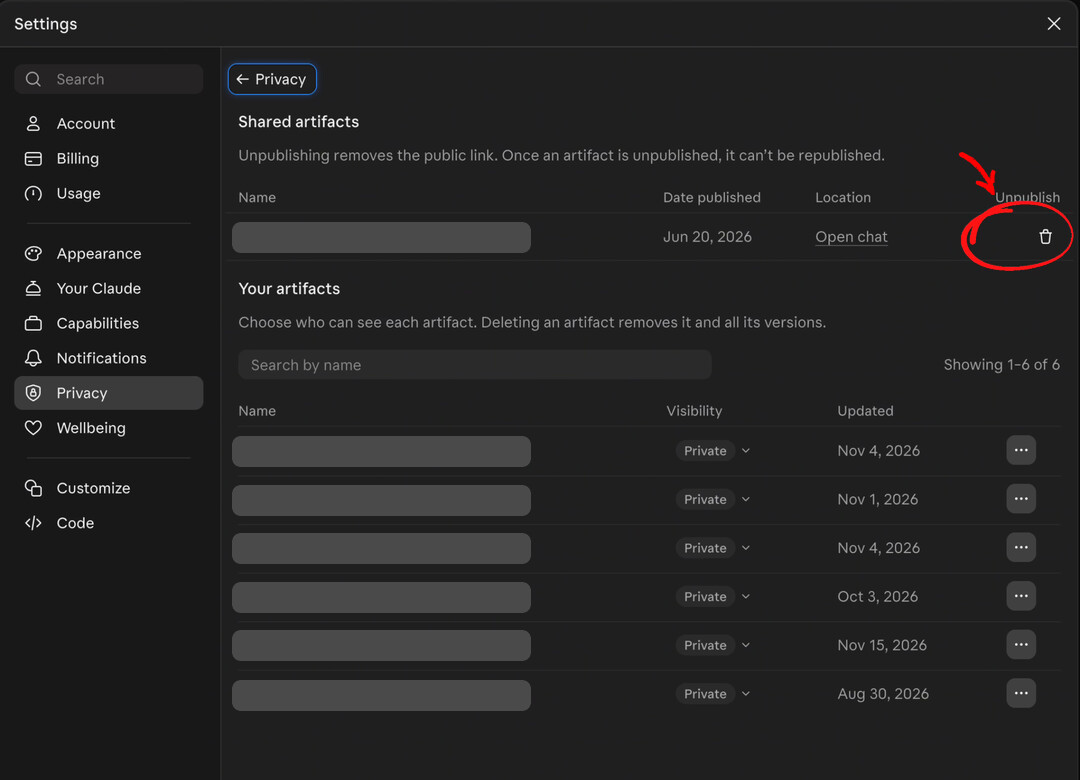
- Now look at the list underneath, Your artifacts. Each one has a Visibility setting. If any say Public, click the word Public and choose Private from the little menu.
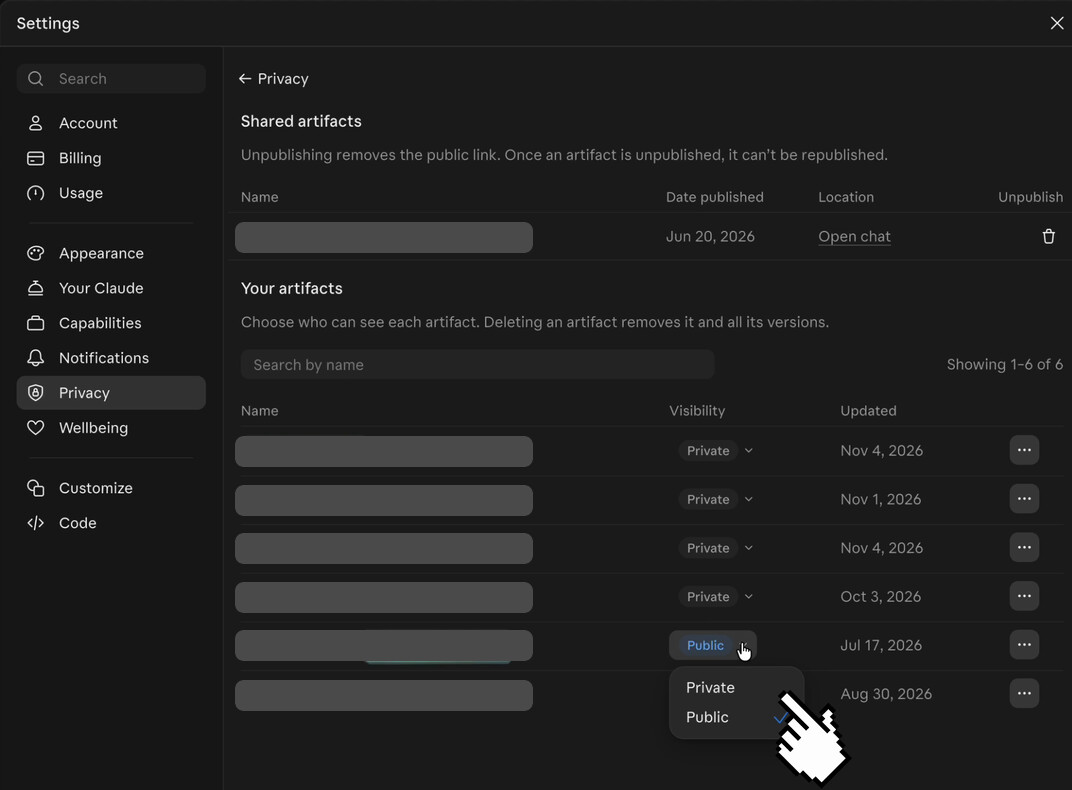
Claude tells you right on that page: once an artifact is unpublished, it can't be republished. Unpublishing also permanently deletes anything the artifact had saved, like entries people typed into it. If it's one you still want people to use, leave it up.
| Shared chat | Shared artifact | |
|---|---|---|
| What it is | A conversation you turned into a link | Something Claude built that you published |
| Who can open it | Anyone with the link | Anyone with the link, no Claude account needed |
| Where your list is | Settings, Privacy, Shared chats | Settings, Privacy, Shared artifacts |
| How to take it down | Trash can under Unshare | Trash can under Unpublish, or set Visibility to Private |
| Can you share it again later | Yes, and the link then includes your newer messages | No, an unpublished artifact can’t be republished |
Your two lists are the answer. When the Shared chats page is empty, and the Shared artifacts page shows nothing published and every artifact set to Private, none of your chats or artifacts has a public link anymore.
When I checked mine, I found a trip guide from last summer still set to Public. I’d forgotten all about it.
Sharing a chat is a great way to show somebody what Claude did for you, so keep doing it. Just do it on purpose:
- Scroll to the top first. The link shows the whole conversation, not only the last answer. If something personal is up there, start a new chat with only the part you want to show.
- Share, then unshare. Once your friend has read it, come back to Settings and take the link down.
- For one answer, copy and paste. If someone only needs a recipe or an email draft, copy that one reply into a text or an email. No link, nothing to clean up later.
Unsharing turns off the link from this point forward. It can't pull back a copy someone already saved or a screenshot they took. If a shared chat had a password, an account number, or anything like it typed into it, unshare the chat and change that password too.
Sources: Claude help center: Share and unshare chats · Claude help center: Share artifacts · Malwarebytes: Shared Claude chats were searchable on Google (July 28, 2026) · TechRepublic: Claude shared chats appeared in Google Search
Want more like this?
One simple AI win in your inbox every Sunday. No jargon, no overwhelm, unsubscribe whenever you like.
Want more like this?
Free AI guides added regularly. No jargon, no overwhelm.
kellystrattonai.com