
25 ChatGPT Learning Codes: How to Use ChatGPT to Learn Anything Fast
Learn anything faster with the ChatGPT you already have. Get any topic on one page of notes, pull the big ideas out of a book in minutes, test yourself with flashcards, and finally make the confusing stuff make sense. Seven short codes to start, and 18 more for whatever you're learning next.
Save it, print it, read it offline. It's yours.
You can learn almost anything faster when ChatGPT does the sorting for you. Type one short code and a topic, and you get the whole thing boiled down, explained simply, or turned into a test you can take. It works for a class, a new job, a book you’ve been meaning to finish, or anything you’re curious about.
A learning code is a short word you type into ChatGPT, like /flashcards or ELI5, followed by the topic you want to learn. The code tells ChatGPT what to make. The topic tells it what about. ChatGPT reads the two together and does the rest.
These seven are short on purpose. You don’t paste anything long. You type the code, add your topic, and send.
- Open a new chat in ChatGPT.
- Type the code, then your topic. Put what you want to learn right after the code:
/sticky notes black holes - For the two book codes, add the book first. Tap the plus button and add a photo of the cover or a PDF, or type the title and author. Then type the code.
- Send it and save what comes back.
| What to type | What you get |
|---|---|
1. /sticky notes + any topicExample: /sticky notes black holes | The topic boiled down into a page of notes, so you can learn it quickly |
2. A book + /coreconceptsExample: The Power of Habit, then /coreconcepts | The book's big ideas pulled out for you, so you get the lessons in minutes instead of weeks |
3. /socrates + a questionExample: /socrates what is consciousness | ChatGPT stops handing you answers and makes you think by asking you questions |
4. /flashcards + any topicExample: /flashcards photosynthesis | A set of flashcards, so you can test yourself |
5. ELI5 + any topicExample: ELI5 quantum physics | Any topic explained like you're five, so the confusing stuff finally makes sense |
6. A book + /storymapExample: The Odyssey, then /storymap | The book's whole story mapped out, so you never lose track of who's who and what happens |
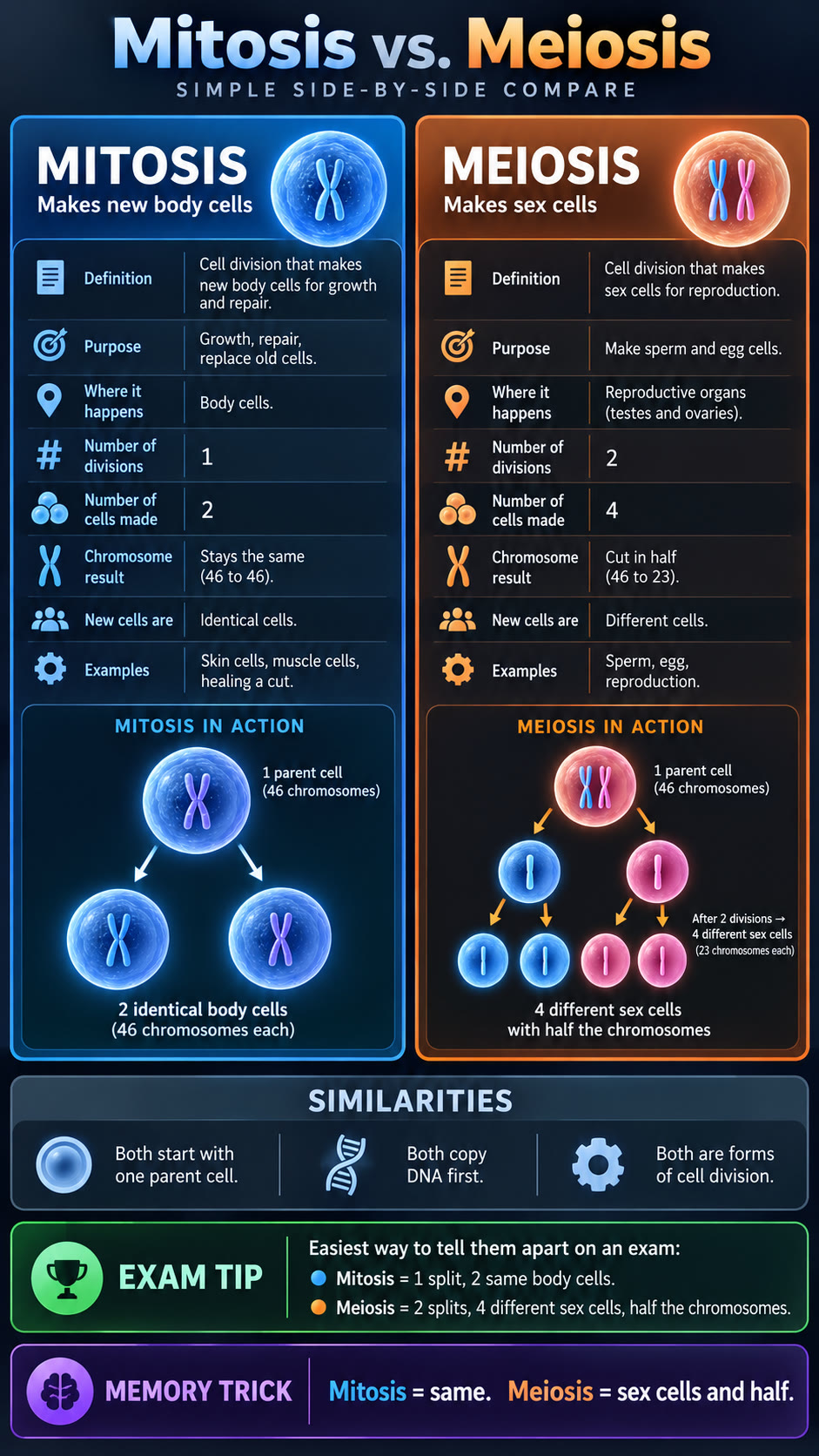
7. /compare + two thingsExample: /compare mitosis and meiosis | Two things you keep mixing up, side by side, so you finally stop confusing them |
Here’s what came back when I ran five of them.
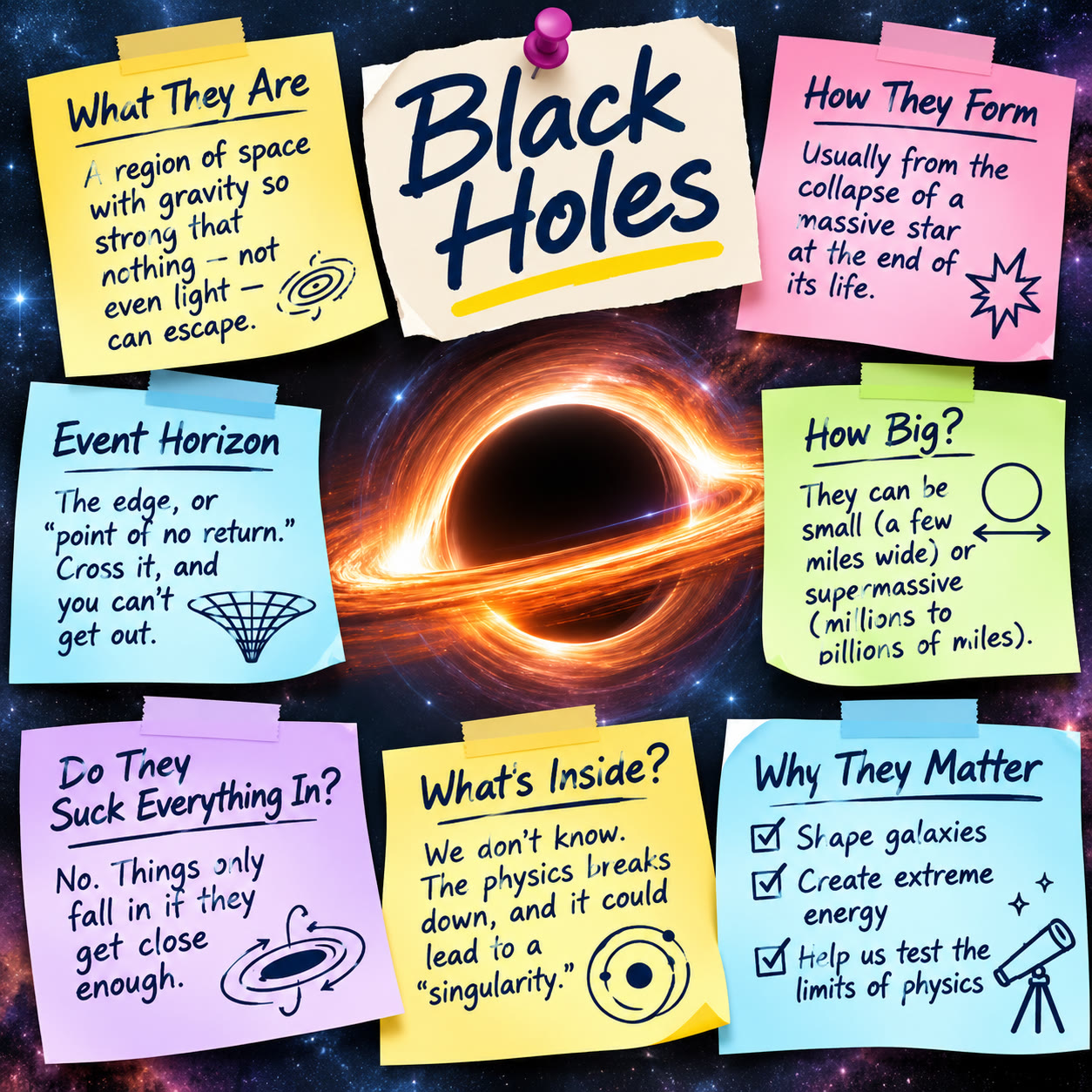
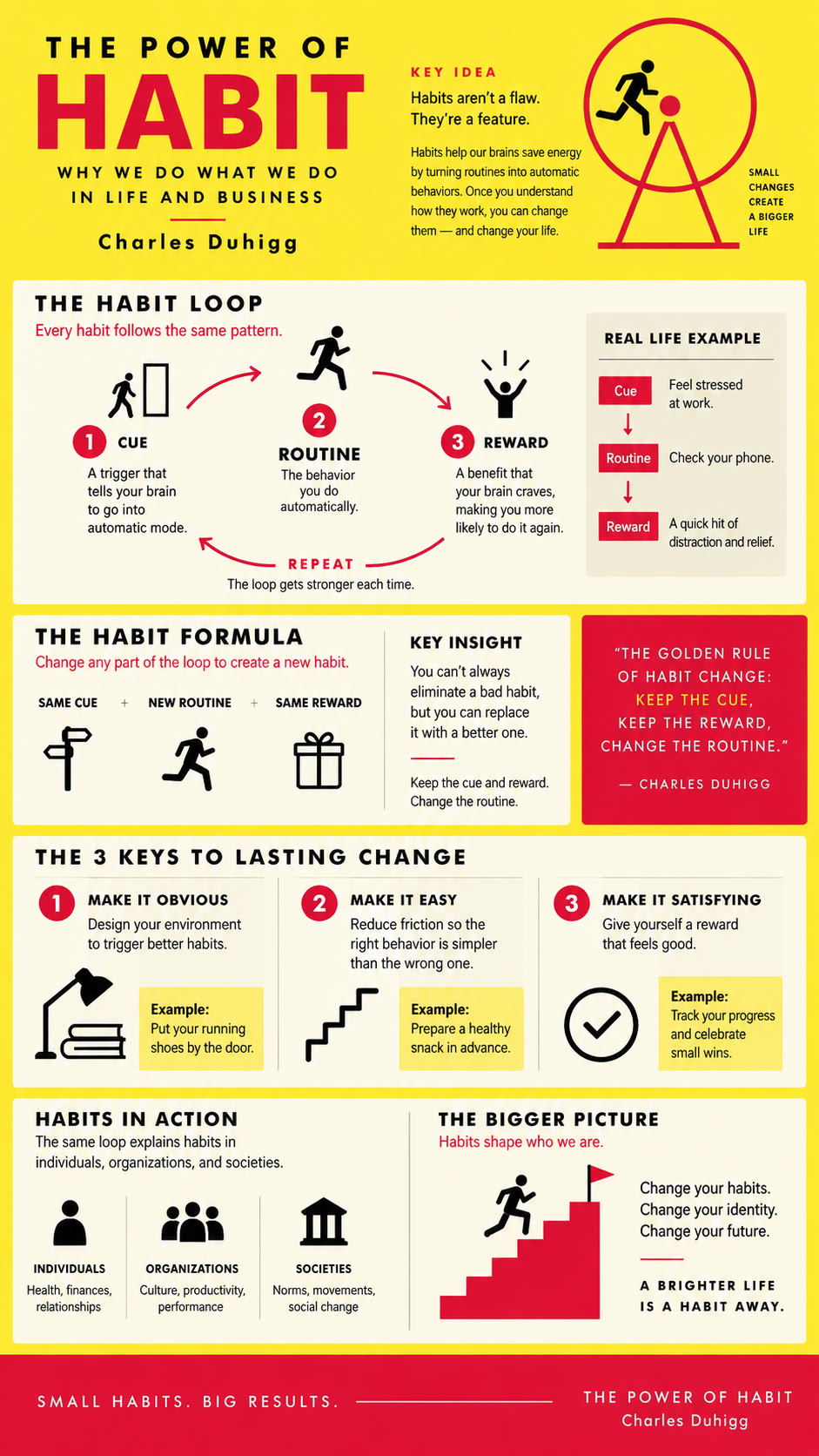
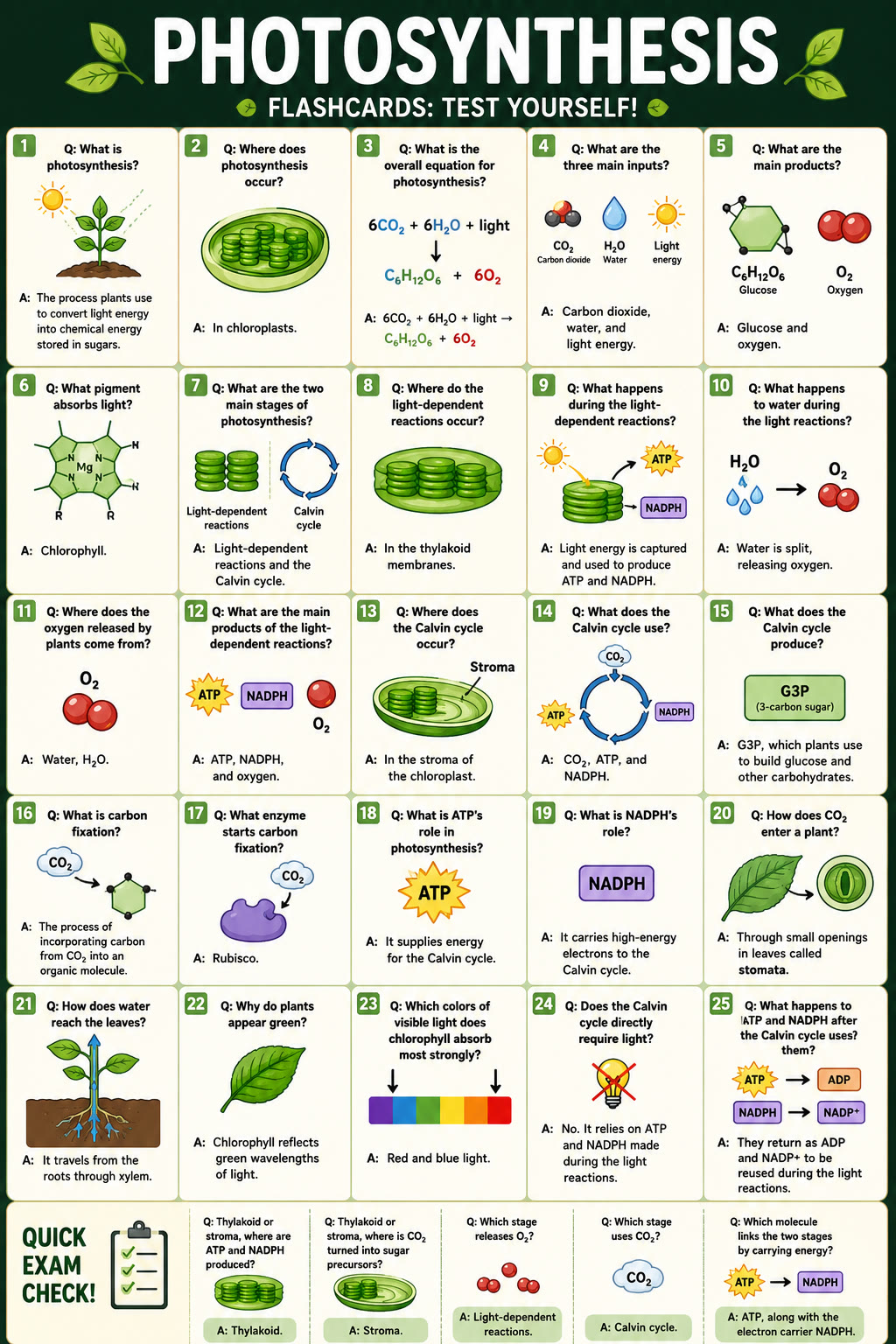
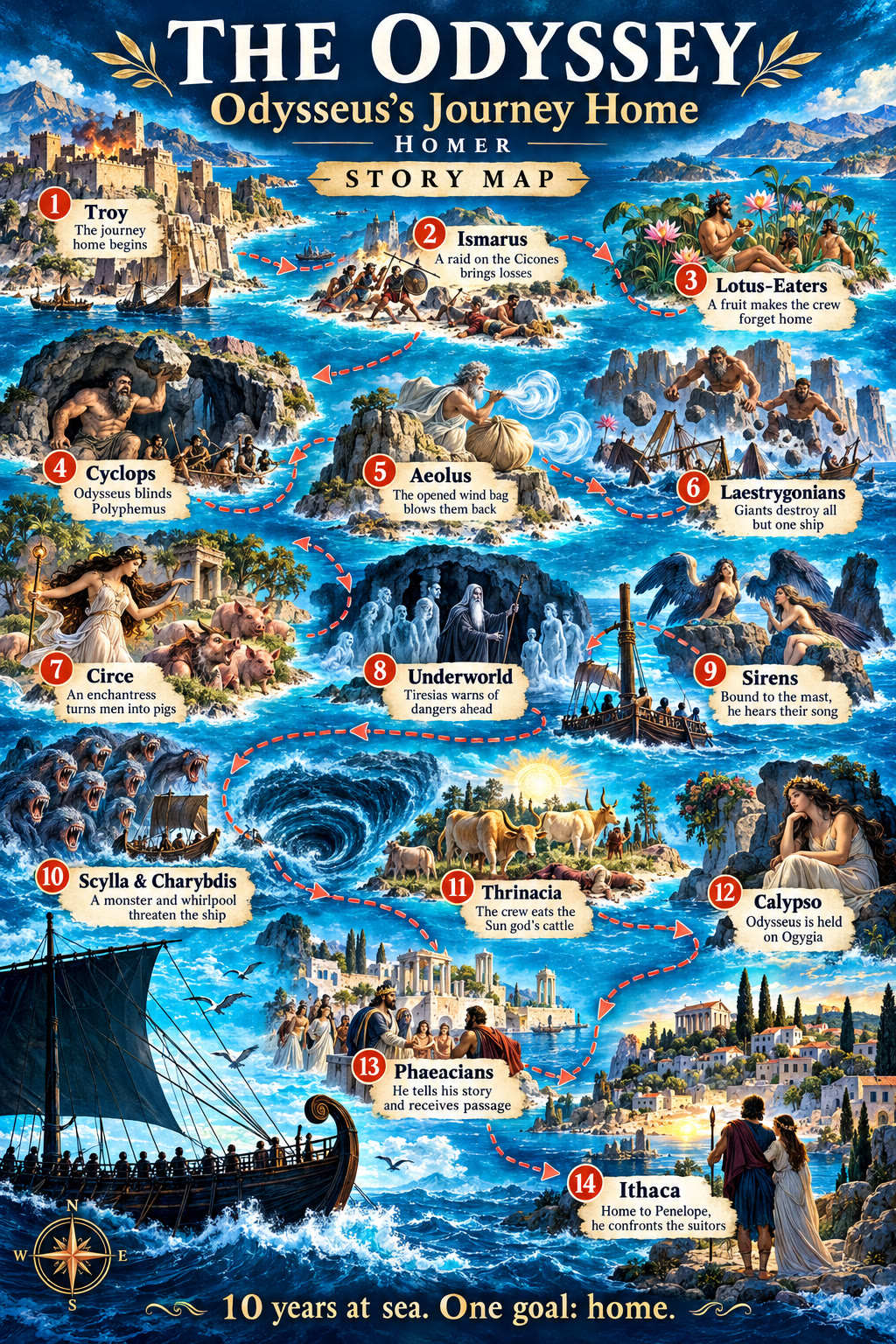
/socrates and ELI5 come back as a conversation, not a page. With /socrates, answer each question in your own words and keep going. When you want the straight answer, tell ChatGPT you're done and ask for a summary. ELI5 stands for Explain Like I'm 5. If the answer is too simple, ask for the same thing again for a ten-year-old.
No. There’s no hidden menu in ChatGPT, and nothing to install or buy. A code is a short word, and ChatGPT reads it with the topic you add and works out what you want. That’s why they work in any new chat. If a code ever misses, type the full sentence for it below and you’ll get the same thing.
| The code | The full sentence |
|---|---|
/sticky notes | Turn [TOPIC] into one page of sticky notes. One idea on each note, in simple words, as an image I can save. |
/coreconcepts | Pull out the biggest ideas in this book and turn them into one visual. Explain each idea in a sentence or two with a simple illustration, and end with the book's message in one line. |
/socrates | Teach me [TOPIC] the way Socrates would. Don't give me the answers. Ask me one question at a time and wait for my reply, so I work it out myself. |
/flashcards | Make a set of flashcards on [TOPIC], with a question and its answer on each card, on one page I can save and test myself with. |
ELI5 | Explain [TOPIC] like I'm five. Use simple words and everyday examples. |
/storymap | Turn this book into one illustrated story map. Show the main character's journey from start to finish, with each place or turning point in order, a small scene for each, and a short label. Make the art style fit the book. |
/compare | Compare [TOPIC 1] and [TOPIC 2] side by side on one page: what each one is, how they're alike, how they're different, and the easiest way to tell them apart. |
Yes. The codes are just words, so there’s nothing to buy, and ChatGPT makes images on every plan, including the free one. The free plan has lower limits on how many images you can make. ChatGPT tells you when you reach the limit and when it resets. The codes that come back as a conversation or as text, like /socrates and ELI5, don’t use an image at all.
Stay in one chat and run the codes in order, so each one builds on the last.
- Get the whole topic on one page. Type
/sticky notesand your topic. - Clear up what’s confusing. Type
ELI5and the part that didn’t make sense. - Sort out the look-alikes. Type
/compareand the two things you keep mixing up. - Test yourself. Type
/flashcardsand the topic, cover the answers, and see what stuck. - Make it yours. Type
/socratesand the topic, and answer the questions in your own words.
One thing to do every time: check names, dates, and numbers against your book or your notes before you study from a page. A picture can get a detail wrong.
These 18 go deeper, so each one comes with its full prompt. Copy the prompt, swap [TOPIC] for what you’re learning, like the Cold War or how interest rates work, and paste it into ChatGPT. They’re sorted by what you need right now.
Understand It
Start here when a topic doesn’t make sense yet.
8. /simplify: Explain a hard topic in simple language
Explain [TOPIC] as if I am learning it for the first time. Avoid complicated language and unnecessary details. Break the topic into small steps, use simple examples or analogies, and point out the 3-5 ideas I need to understand before moving on to anything more advanced.9. /teachme: Learn it step by step, like you have a tutor
Teach me [TOPIC] step by step like a great tutor. Start with the basics, then gradually move to the more difficult parts. After each major concept, give me a simple example and ask me one quick question to check whether I understand it before continuing.10. /examples: Learn it through examples that get harder
Teach me [TOPIC] using examples. Start with the simplest possible example, then give me three more examples that gradually become more difficult. For each one, explain exactly how it connects to the concept. Finish by giving me one example to solve or explain myself.11. /formula: Learn the formulas and when to use each one
Teach me the important formulas for [TOPIC]. For each formula, explain what it means, what every symbol represents, when I should use it, and give me one worked example. Also include the most common mistake students make when using each formula.12. /timeline: Put events in order on a timeline
Turn [TOPIC] into a clear chronological timeline. Include the most important dates, events, people, causes, and consequences. Keep each timeline entry short and easy to remember. Highlight the events most likely to matter on an exam and finish with a quick cause-and-effect summary.Organize It
Turn what you now understand into something you can review.
13. /studyguide: Turn any topic into a clear study guide
Create a complete study guide for [TOPIC]. Break it into the most important concepts, key terms, definitions, examples, and facts I need to understand for an exam. Keep everything simple, clear, and easy to scan. Highlight the information most likely to be important and finish with a short "What You Must Remember" section.14. /keyterms: Pull out the key words and what they mean
Extract the most important vocabulary from [TOPIC]. Create a list of the key terms I am most likely to need for a test. For each term, give me a one-sentence definition, a simple example, and one clue that helps me recognize it in an exam question.15. /summary: Cut your notes down to the essentials
Summarize [TOPIC] into the smallest amount of information I need to understand the subject. Organize the answer into key ideas, important facts, essential terms, and must-know examples. Remove unnecessary detail and finish with a 5-bullet ultra-short recap I can review before an exam.Remember It
For the things that won’t stick, however many times you read them.
16. /memorize: Get memory tricks for the hard parts
Help me memorize [TOPIC]. Identify the facts, steps, terms, formulas, or concepts that are hardest to remember and create simple mnemonics, acronyms, associations, or memory tricks for each one. Make the memory tricks easy to recall during an exam.17. /mistakes: See the mistakes people make, before you make them
Show me the most common mistakes students make when learning or answering exam questions about [TOPIC]. For each mistake, explain why students make it, what the correct idea is, and how I can avoid making the same mistake. Finish with a short "Watch Out For These" checklist.Test Yourself
Testing yourself is what makes it stay. These six do it for you.
18. /quizme: Take a quiz, one question at a time
Create a 10-question multiple-choice quiz on [TOPIC]. Give me four answer choices for each question: A, B, C, and D. Ask me only one question at a time and wait for my answer before continuing. After I answer, tell me whether I am correct, explain the answer in one or two sentences, and then move to the next question. Start easy and gradually make the questions harder.19. /truefalse: Fast true-or-false practice
Create a 15-question true-or-false quiz on [TOPIC]. Ask me one statement at a time and wait for my answer. After I respond, tell me if I am correct and explain why in one sentence. Include some tricky statements that test common misunderstandings, not just obvious facts.20. /practiceexam: Sit a full practice exam
Create a realistic practice exam on [TOPIC]. Include 15 questions with a mix of multiple-choice, short-answer, and application questions. Make the difficulty similar to a real school or college exam. Do not show the answers until the end. Finish with a separate answer key and short explanations.21. /teachback: Explain it back and get corrected
Help me use the Feynman technique to learn [TOPIC]. Ask me to explain the topic back to you in my own words. Then identify anything I explained incorrectly, missed, or made too complicated. Correct my explanation and ask me to try again until I can explain the topic clearly and simply.22. /likelyquestions: See the questions most likely to come up
Act like a teacher writing an exam on [TOPIC]. Generate 10 questions that are most likely to appear on the test based on the core concepts students are normally expected to understand. Include a mix of multiple-choice, short-answer, and application questions. Put the answers and explanations in a separate section at the end.23. /weakspots: Find what you need to review most
Test my understanding of [TOPIC] with 8 questions, one at a time. Adjust the difficulty based on my answers. Keep track of what I get right and wrong. At the end, identify my strongest areas, my weakest areas, and the exact concepts I should review next. Then create a short personalized revision plan focused on my weak spots.When You’re Short on Time
For the night before, or the fifteen minutes before.
24. /examcram: Get the 20 percent that matters most
I have an exam on [TOPIC]. Identify the 20% of information that will help me understand 80% of the topic. Focus on the concepts, facts, formulas, or ideas most likely to matter on a test. Explain each one simply and finish with a "Memorize These Before the Exam" checklist.25. /lastminute: Build a 15-minute review plan
I have very little time to study [TOPIC]. Create a 15-minute emergency revision plan. Prioritize the most important concepts first. Break the session into short time blocks and tell me exactly what to review in each one. Finish with 5 questions I should be able to answer before the exam.Codes 8 to 25 come back as text. To get one as a page you can screenshot, add this line to the end of the prompt: Give me this as a visual instead of plain text, with clear headings, color coding, icons, and short text, so I can screenshot it and study from it.
The takeaway
You now have 25 ways to get ChatGPT to teach you, and you only need one to start. Pick the thing you’ve been meaning to learn, type /sticky notes and its name, and see how much of it fits on one page. Then keep going. You’ll be surprised how fast it comes together.
Want more like this?
One simple AI win in your inbox every Sunday. No jargon, no overwhelm, unsubscribe whenever you like.
Want more like this?
Free AI guides added regularly. No jargon, no overwhelm.
kellystrattonai.com