
Solopreneurs Hitting $1M Just Doubled
Three Claude setups that do the jobs one-person businesses used to hire for: the proposal drafter, the course-to-campaign builder, and the listing rewriter. Full prompts, what to gather first, and how to make each one reusable in five minutes.
Save it, print it, read it offline. It's yours.
In June 2026, Stripe’s economists published a report called “The Age of the Solopreneur.” One line in it is the reason this guide exists: more than twice as many solopreneurs earned over $1 million in 2025 than in 2023. Their explanation was that AI is now doing the jobs a one-person business used to hire for first. The assistant. The marketing help. The agency.
This guide is those three jobs, built as three Claude setups you can have running tonight. Each one is written for a specific kind of solopreneur, but read all three, because the pattern is the same and once you see it you’ll build your own.
The one chart to know
Stripe’s own economists published the numbers behind the headline. If you only look at one chart, look at this one. It shows how much more common a million-dollar one-person business is today than it was in 2019, and the answer is not “a little.”
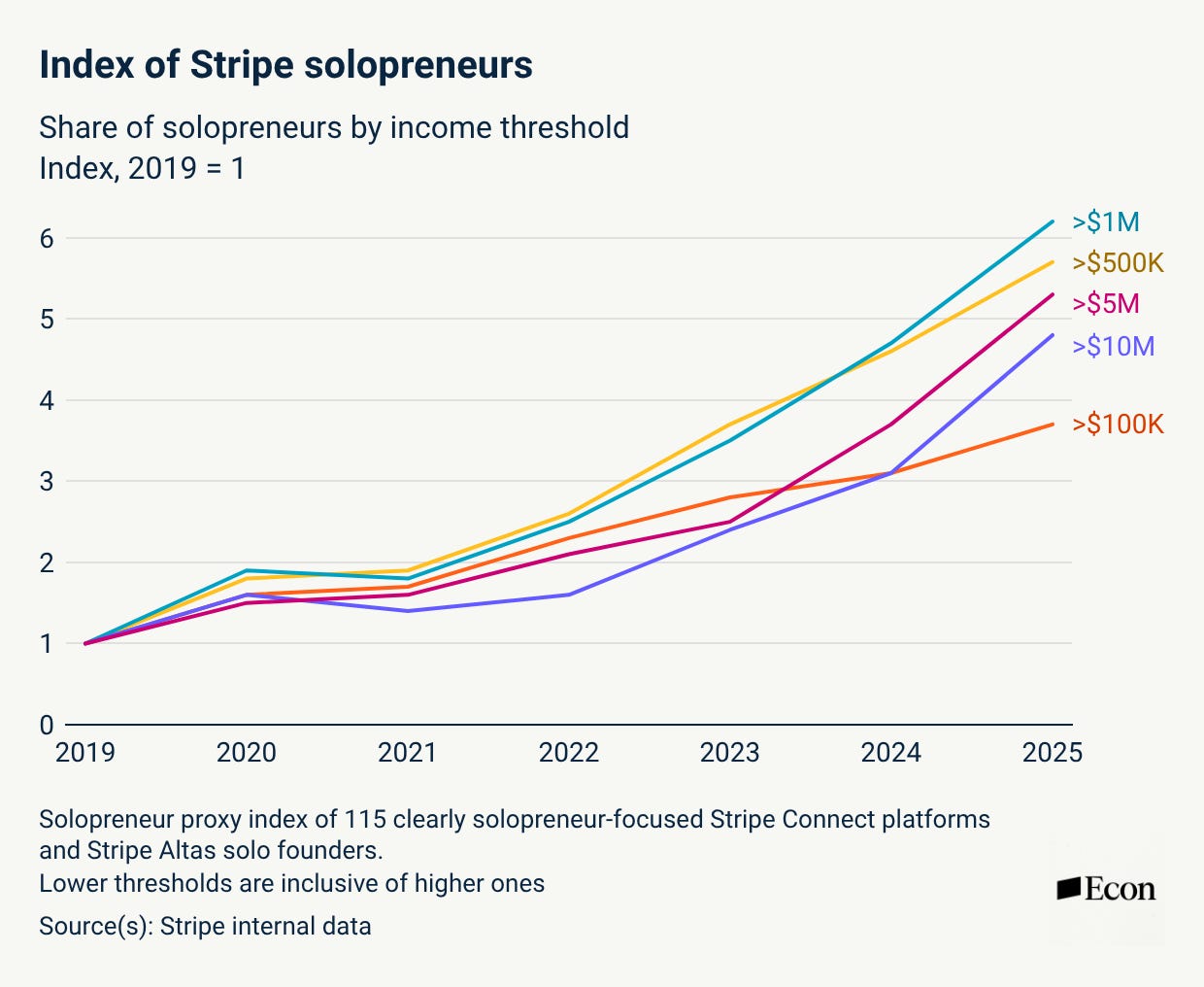
This is the headline chart. Every line starts at 1 in 2019. By 2025 the share of solopreneurs earning over $1 million is sitting around 6, meaning six times as common as it was six years ago. Notice the shape: it was a gentle slope until 2022, and then it bends upward. That bend is the AI era starting. Also notice which line is lowest: the $100K one. The growth isn’t happening at the bottom. It’s happening at the top, in the one-person businesses that used to need a team to reach those numbers.
Every setup here works the same way. You give Claude two things once: who you are (your services, your prices, how you talk) and examples of your best work. You save that as a Project so you never paste it again. Then every job becomes one short message: paste the new thing, get the draft, fix two sentences, send. The setup takes five minutes. The payoff is every proposal, campaign, or listing after that.
First, make it reusable: Claude Projects in two minutes
Everything below assumes you’re working inside a Claude Project, not a fresh chat. A Project is a folder in Claude with its own standing instructions and files. Whatever you put in the instructions, Claude remembers every time you open that Project. That’s what turns a prompt into an employee.
- Open Claude, click Projects in the left sidebar, then New project. Name it after the job: “Proposals,” “Course Campaigns,” “Listings.”
- Click Set project instructions (or the gear icon). This is where the setup prompt from each section below goes. Paste it once.
- Under Project knowledge, upload the examples the section tells you to gather: past proposals, past emails, your price sheet. Claude reads them every time.
- Start a new chat inside the Project for each job. Paste the new material, use the run prompt, done.
If you’re on the free plan and don’t have Projects, the setups still work. You paste the setup prompt at the top of a new chat each time. It costs you a copy-paste, nothing else.
The job it replaces. You get off a sales call with a potential client. You have notes, or a recording, or three things you remember. Somewhere in the next 48 hours you need to send a proposal that restates what they said they need, shows them the package, names a price, and asks for a yes. Most solopreneurs let this sit for three days because it’s the writing they dread most, and the client cools off while it sits.
What to gather before you start (once):
- Two or three proposals you’ve sent that won. Real ones. If you don’t have proposals, two emails where you quoted a job and got it.
- Your services and what each costs. A simple list is fine. If your pricing is “it depends,” write down what it depends on.
- Three questions you always ask on a sales call.
- What you never say yes to. The red flags, the scope you refuse, the discount you don’t give.
The setup prompt. Paste into the Project instructions:
You write client proposals for me. I'm a [your title: business coach / brand designer / bookkeeper / etc.] and my clients are [who they are]. Read the past proposals and price sheet in this project's files. Match their structure, tone, and length. My proposals always have these sections in this order: what you told me you need (in the client's own words where possible), what I'll do, what it costs, what happens next, and one line about why me. Prices come only from my price sheet. Never invent a price, a deliverable, or a timeline I haven't listed. Never discount. If the call notes are missing something you need, put a bracketed question in the draft instead of guessing. Write like I talk: short sentences, no jargon, no "I'm thrilled," no exclamation points.The run prompt. Each new job is one message in a new chat inside the Project:
Here are my notes from today's call with [client name]. Draft the proposal.

[paste your notes, or the call transcript, or the three things you remember]
What comes back. A proposal in your structure, at your prices, quoting the client’s own words back to them in the first section, with bracketed questions wherever your notes were thin. You read it once, answer the brackets, adjust one number if your gut says so, and send it the same afternoon.
What to check before you send. Every number against your price sheet. Every promise against what you can deliver. The client’s name spelled right. That’s the whole review, and it takes two minutes because Claude was told not to invent anything.
The trap. Skipping the past proposals. Without real examples, Claude writes a generic proposal that sounds like every other AI proposal your client has received this month. The examples are what make it sound like you.
Why this works now, not five years ago
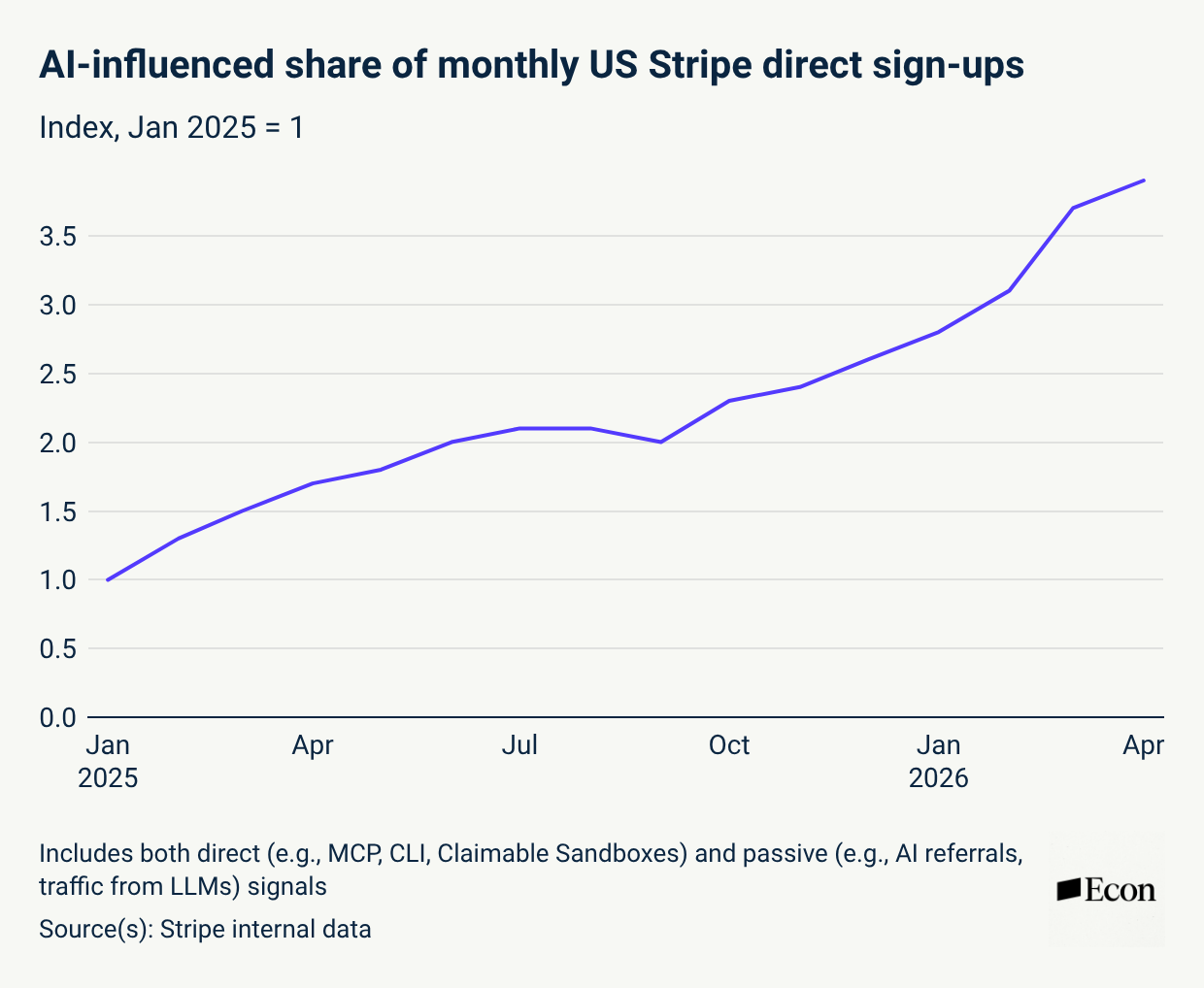
This one is the “why.” It tracks how many new businesses came to Stripe through an AI tool, either because an AI built part of their setup or because an AI sent them there. January 2025 is 1. By April 2026 it’s almost 4. Four times as many new businesses are being started with AI in the loop as sixteen months ago. That’s the same sixteen months the first chart bends upward in. These are the same story.
The job it replaces. You’ve made the thing. A course, a workshop, a paid newsletter, a template pack. Now it needs a sales page, a launch email sequence, and something to post. That’s a marketing person’s whole week, and it’s the reason so many finished courses never launch.
What to gather before you start (once):
- The outline of what you’re selling. Module names and one line each. If you have lesson transcripts or notes, even better.
- Who it’s for and what they’ve tried before that didn’t work.
- Three emails you’ve sent that people replied to. Your real voice, not your polished voice.
- The price, the guarantee if you offer one, and the date it opens or closes.
- Two or three things past students or readers have said about you. Real quotes only.
The setup prompt. Paste into the Project instructions:
You're my launch writer. I sell [what it is] to [who it's for]. Read the course outline, my past emails, and the testimonials in this project's files. Everything you write has to sound like my past emails, not like a marketing template. Rules: never invent a result, a number, or a testimonial. Only use quotes that are in the files. Never use the words "unlock," "transform," "game-changer," or "journey." No countdown-timer urgency unless I've given you a real close date. When I ask for a campaign, deliver it in this order: a sales page, then a five-email launch sequence, then ten short hooks for social posts. Each email under 200 words. Each hook under 15 words.The run prompt.
Build the launch campaign for [name of the thing]. It opens [date] and closes [date] at [price].

[paste the outline, or the lesson notes, if they're not already in the project files]
What comes back. A sales page built on your outline, in your email voice, using only your real testimonials. Five emails that walk from “here’s the problem” to “doors close tonight” without the fake urgency. Ten hooks you can film or post as text. You’ll rewrite the subject lines, because subject lines are personal, and cut whichever email feels like too much.
What to check before you send. Every claim about results. If the sales page says “students have done X,” make sure a real student did X. Claude was told not to invent, and it usually doesn’t, but this is the one place where a slip costs you trust. Read the emails out loud. Anything you wouldn’t say to a subscriber in person, cut.
The trap. Feeding it a polished “brand voice document” instead of your real emails. Your real emails are the voice. The brand document is what you wish you sounded like, and Claude will write to that instead of to you.
The job it replaces. You have 40 listings. Half were written at midnight two years ago. The titles don’t match how people search, the descriptions are three lines, and the agency that offered to “optimize your shop” wanted $1,200 a month. This setup rewrites every listing in an afternoon, in your voice, around the words buyers type.
What to gather before you start (once):
- Your three best-selling listings, copied as text. Title, description, tags.
- Ten words or phrases buyers use to find things like yours. The fastest way: open Etsy or Shopify’s search bar and type the start of your product name. The autocomplete suggestions are what real people search. Write down ten.
- A paragraph about your shop in your own words. Who you are, how you make things, what you refuse to do.
- What you will never claim. If it’s not handmade, not organic, not waterproof, say so here, so Claude never says it there.
The setup prompt. Paste into the Project instructions:
You rewrite product listings for my [Etsy / Shopify] shop. I sell [what] to [who]. Read my three best listings and my shop description in this project's files. Match their voice. Use the search phrases in the files naturally in titles and the first two lines of descriptions, because that's what buyers type. For every listing I give you, return: a title under 140 characters that leads with what the item is and who it's for, a description with a two-line opener, then materials and size, then how it's used or gifted, then care or shipping notes, and 13 tags. Never invent a material, a dimension, a weight, or a claim like handmade, organic, or waterproof. If the original listing doesn't say it, ask me in a bracket instead of guessing. No exclamation points. No "perfect for." No "elevate."The run prompt. One listing per message, or batch five at a time:
Rewrite this listing.

[paste the current title, description, and tags, or describe the product in three lines if there's no listing yet]
What comes back. A title that leads with the searchable words, a description that reads like your shop and puts the search phrases where Etsy and Shopify actually read them, and a full set of tags. Where your old listing was missing a dimension or a material, a bracket asking for it, not a guess.
What to check before you publish. Every material, every measurement, every claim. Claude was told not to invent them and to ask instead, so mostly you’re answering brackets. Then read the title as a buyer would. If you’d click it, publish it.
The trap. Rewriting everything in one giant paste. Five at a time keeps the quality up and lets you catch a bad pattern before it’s in 40 listings.
Is this for you? The chart says yes
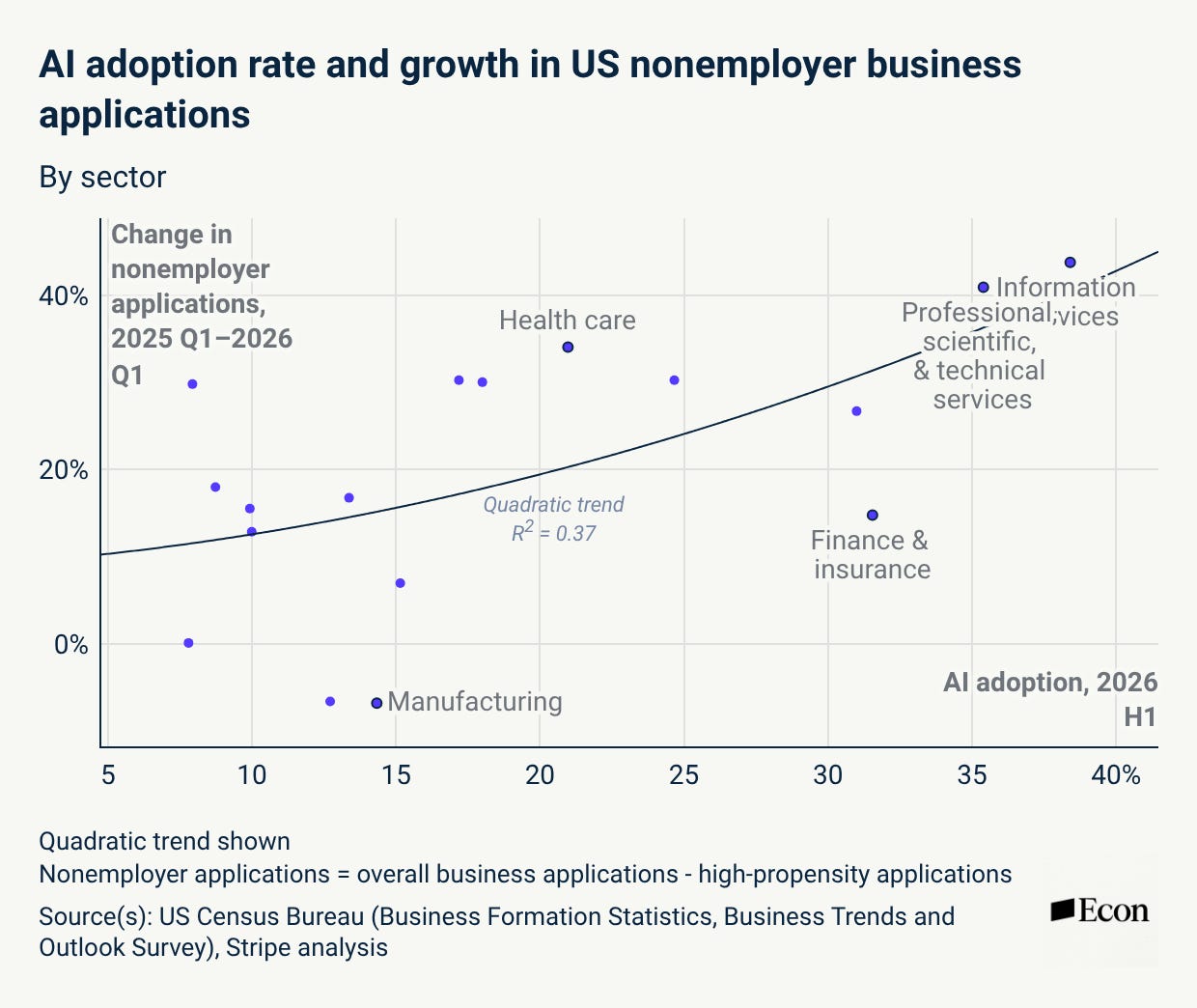
One more chart, because it answers “is this for me?” Each dot is an industry. Left to right is how much that industry uses AI. Bottom to top is how many new one-person businesses it added in the last year. The top-right corner, the industries using the most AI and spawning the most solopreneurs, is information and professional services. Consulting, design, writing, marketing, bookkeeping, coaching. If you sell what you know, you are standing in the corner of this chart where the growth is. Manufacturing is at the bottom, which tells you the opposite: this shift is about knowledge work, not factories.
The rule that makes all three safe
Notice the sentence that’s in every setup prompt: never invent, ask in a bracket instead. That one instruction is the difference between an assistant and a liability. It’s also what keeps you legally and ethically in the clear: AI drafts, you decide, and nothing goes out that you didn’t read. If you take one thing from this guide into every other prompt you ever write, take that line.
What to build after these three
Once one of these Projects is running, you’ll see the shape: standing instructions plus your real examples plus one short run prompt. That shape works for the invoice follow-up email, the FAQ page, the onboarding doc for a new client, the monthly report. Every one of those was a task you’d have handed to your first hire. The hire is the Project.
The road is shorter than it was
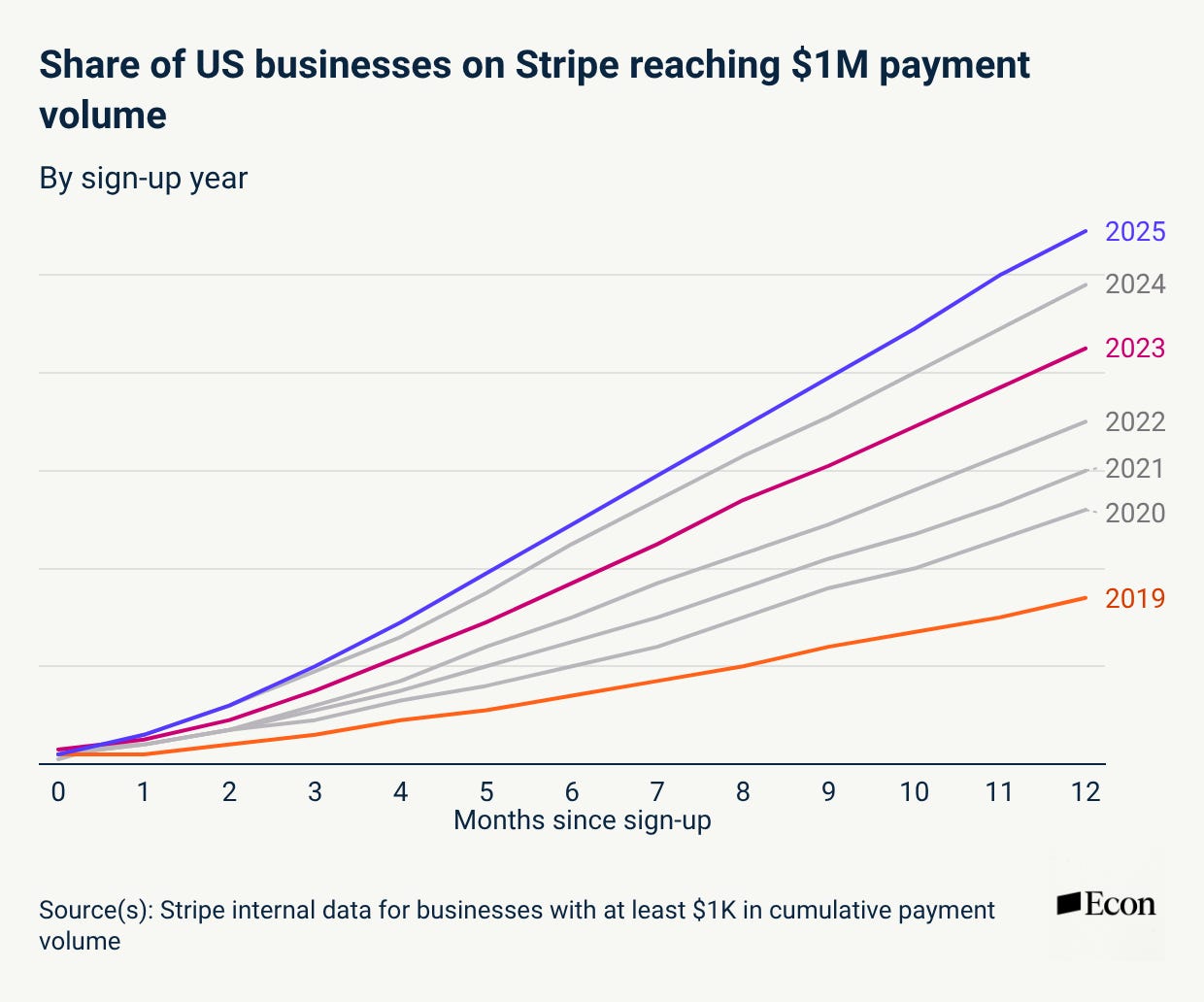
Each line is a year’s worth of new businesses, and the height shows how many of them hit $1 million within their first twelve months. The 2019 line is the orange one at the bottom. The 2025 line is the purple one at the top. Read it as: a business that started in 2025 got to a million dollars faster, and more often, than one that started any year before. Stripe puts it at roughly 30% better than the 2023 cohort and about three times better than 2019. The road is shorter than it used to be.
The takeaway
Stripe’s number isn’t about geniuses. It’s about people who stopped waiting until they could afford help and built the help instead. Pick the setup that matches your business. Gather the four things it asks for. Paste the setup prompt into a Project tonight. Tomorrow, run one real job through it. That’s the first hire, and it cost you an evening.
Want more like this?
One simple AI win in your inbox every Sunday. No jargon, no overwhelm, unsubscribe whenever you like.
Want more like this?
Free AI guides added regularly. No jargon, no overwhelm.
kellystrattonai.com