
Is That Email or Text a Scam? Drop It Into AI First
Stop guessing about suspicious emails and texts. One prompt for ChatGPT or Claude gives you a verdict, the red flags with the exact words quoted, what to do, and what to do if you already clicked.
Save it, print it, read it offline. It's yours.
Everyone gets them: the storage bill that failed, the gift card you won, the job that pays $600 a week for an hour of work. Americans reported losing about $16 billion to scams in 2025, up about 25% in one year, according to the FTC. This guide gives you a second set of eyes that never gets tired: one prompt for ChatGPT or Claude that reads a suspicious email or text, gives you a verdict, quotes the exact red flags, and tells you what to do, including what to do if you already clicked. You’ll see it run on real messages from my own inbox.
It can find a sender address that doesn't match the name, a brand name hiding inside a fake address, a link that doesn't belong to the company, pressure and threats, a request for a code or a payment, a push to move you to another number or app, and the shape of the scams going around right now. It can't open a link or see where a link really goes. It reads the address that's showing, so it catches one that's obviously wrong, like a Russian free-mail address claiming to be Walmart, but if an address looks right, it can't tell whether someone is faking it. And it doesn't know what you signed up for. A scam built carefully enough can get past it, and a real message with one odd detail can get flagged. Use it to slow down and look closer. If money, a code, or a login is involved, check it yourself through the company's own app, a website you type by hand, or the number on the back of your card.
ChatGPT or Claude, free plan is fine, and the suspicious message. Nothing to install.
- Blur your own details first. Your card number, a password, a one-time code. Scratch those out before you drop it in. The scammer’s details stay in; that’s what you want checked.
- Get the message into the chat. For an email, the sender’s real address matters most, so either screenshot the top of the email where the address shows, or copy the whole thing including the “from” line. For a text, a screenshot is easiest.
- Copy the prompt below into the chat, then drop in the message. Or attach the screenshot right after the prompt.
- Read the verdict first, then the red flags. The red flags quote the exact words, so you can see each one in the message yourself.
- Do what the “what to do now” section says. Never use a link, a number, or an address from the message itself.
It checks eleven red flags, compares the message to the scams going around right now, and answers in the same order every time.
You are my scam checker. I'm going to drop in or attach a suspicious email, text, DM, link, or a description of a phone call. Read only what I give you. Never visit a link, and never say a message is "safe." Give me a second opinion.

First, if what I give you includes my own card number, password, or a one-time code, tell me once to blur that next time, and never repeat it back to me.

Then check it against these red flags, and quote the exact words or details you find:
- Urgency or threats: account closing, legal action, "act now"
- Asks for a one-time code, a password, a PIN, or remote access to my device
- Asks for payment by gift card, crypto, or a transfer to a new account
- The sender name doesn't match the sender address or domain
- A lookalike domain: a real brand name tucked inside a longer or odd address
- A link whose address doesn't belong to the company it claims to be
- An unexpected attachment or "contract"
- A prize, refund, or offer that's too good to be true
- A push to move to another app, or to keep it secret
- A generic greeting from someone who claims to know me
- Sloppy spelling or grammar (a weak sign on its own, never the whole reason)

Compare it to common scams: fake delivery fee, fake storage or subscription "payment failed," fake bank "move your money to a safe account," "hi mum, new number," fake brand deal or copyright warning, fake invoice or changed bank details, overpayment and refund, fake job that asks me to pay first, romance that turns to money, fake virus pop-up with a number to call, someone offering to recover money I already lost.

Reply in this order, short and plain, no lecture:
1. VERDICT: "Very likely a scam," "Suspicious, treat it as a scam until you verify it yourself," or "No red flags found." (Two or more strong red flags or a clear match to a known scam means very likely. One flag or a partial match means suspicious. Nothing on the list means no red flags found. Don't invent weak flags.)
2. WHAT THIS LOOKS LIKE: the scam type in one line and how it works, or say plainly that it doesn't match a known pattern.
3. RED FLAGS: each one with the exact words quoted. If none, say so.
4. WHAT TO DO NOW: don't click, reply, pay, or share a code. Check through a route I find myself: the official app, a website I type by hand, or the number on the back of my card. Never contact details from the message.
5. IF I ALREADY CLICKED, PAID, OR SHARED A CODE: the steps, in order. Don't invent phone numbers or websites; tell me to search the bank's or platform's own help page.
6. End with exactly: "One more set of eyes, not proof. If money, a code, or a login is involved, check it yourself first."

Be calm, never shaming. Here's the message:Two emails and one text, all real messages I got. I dropped each one in with the prompt above. Here’s what came back.
1. “Payment failed for your Cloud storage renewal”
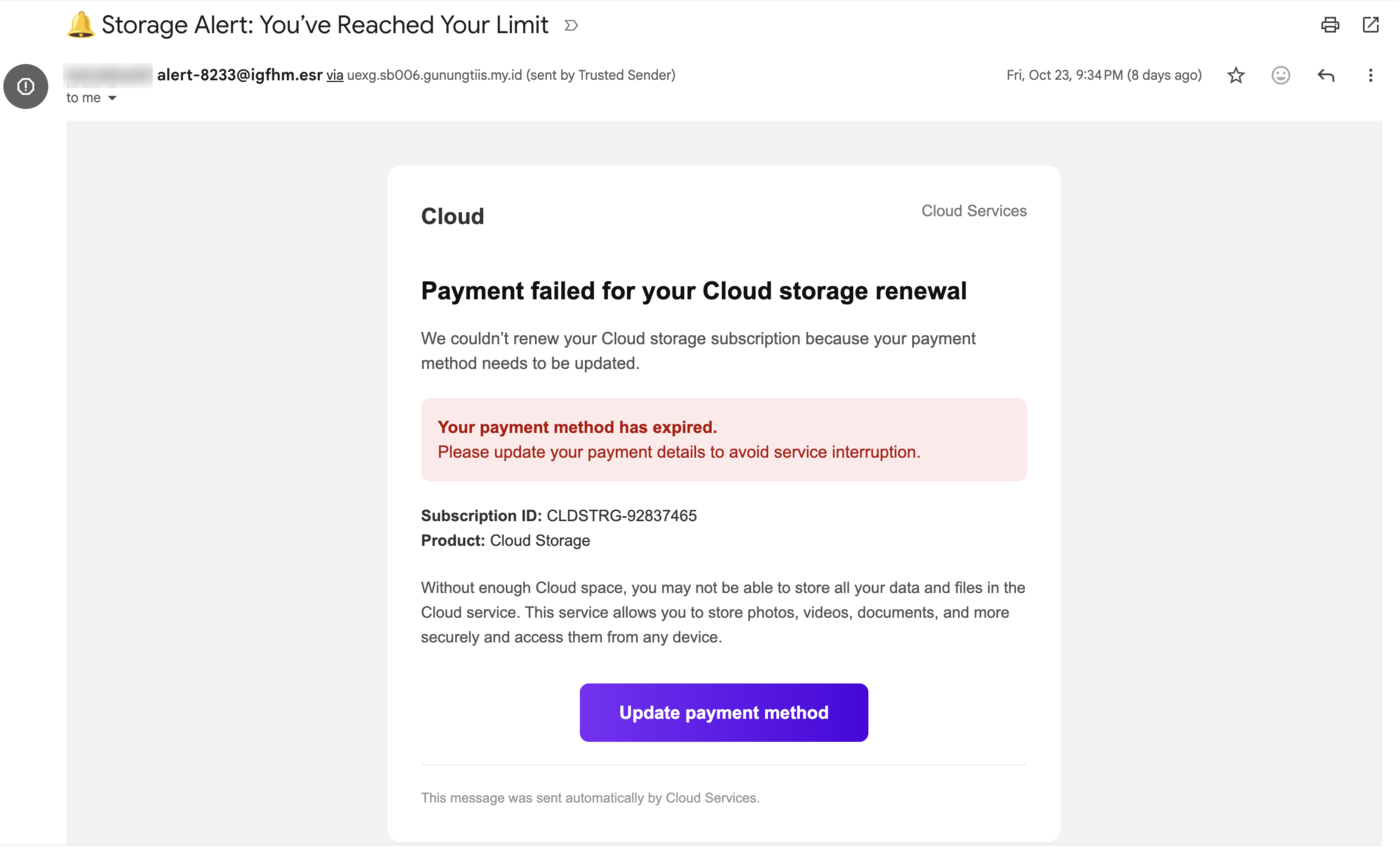
Verdict: Very likely a scam. A fake “payment failed” email built to get your card details.
- The sender doesn’t match any real company. The display name was my own username, and the address was a random string routed through a domain in Indonesia. No storage company sends from that.
- No company is named. It says only “Cloud” and “Cloud Services.” Apple, Google, Microsoft, and Dropbox all name themselves. Scammers stay vague so it fits whoever you use.
- The subject and the body don’t match. The subject says “Storage Alert: You’ve Reached Your Limit.” The email says “Payment failed.” A real alert says one thing.
- Urgency: “Your payment method has expired,” “avoid service interruption.”
- The same subscription number showed up in two different emails. That’s a template, not an account.
2. “You have received a payment $500.00” (the Walmart gift card)
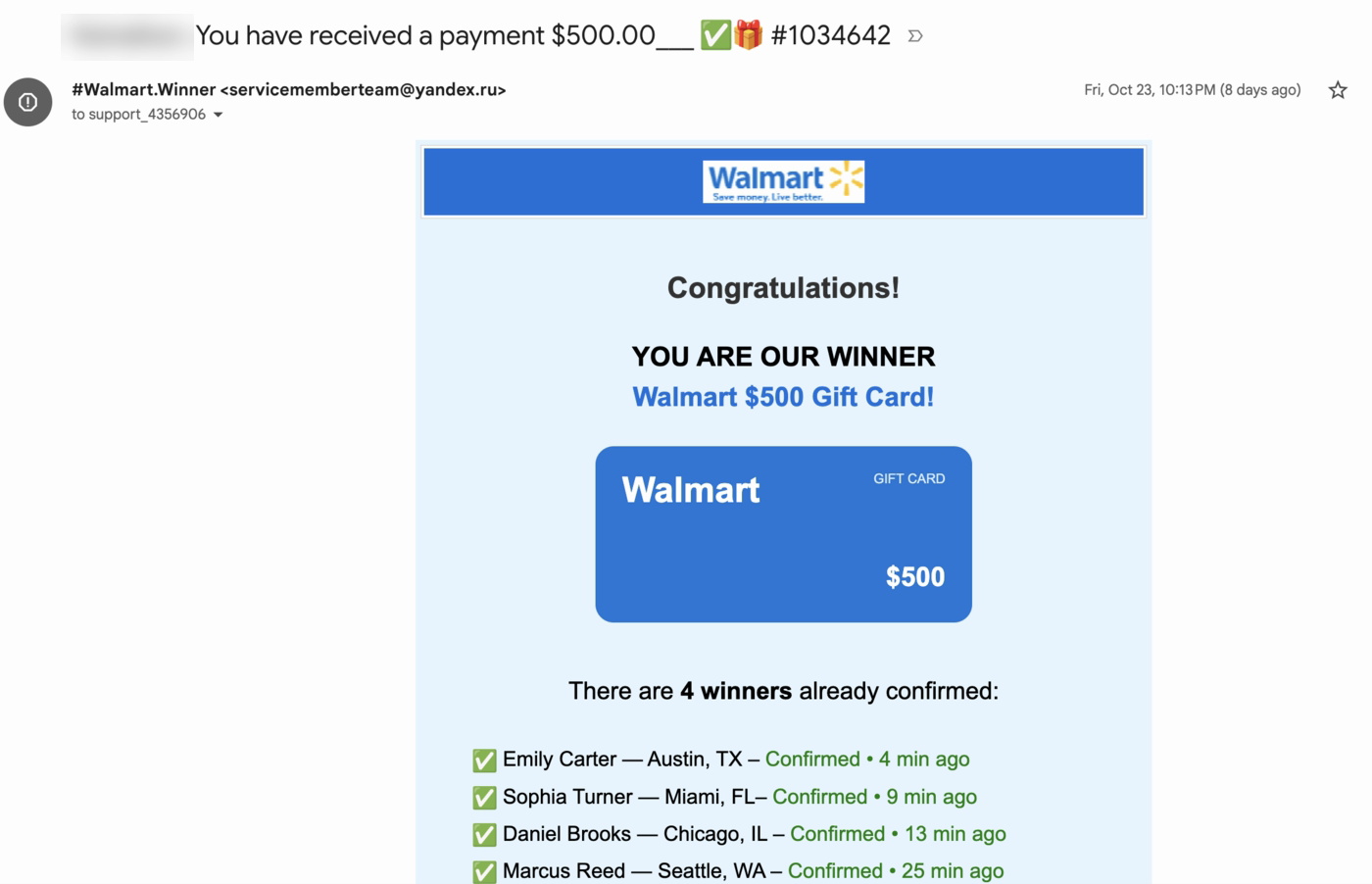
Verdict: Very likely a scam. A fake prize that leads to a page asking for a “shipping fee” or a login.
- The sender name doesn’t match the address. The name says “#Walmart.Winner.” The address ends in yandex.ru, a free Russian email service. Walmart doesn’t send from it.
- Too good to be true: “YOU ARE OUR WINNER,” “$500 Gift Card,” for a contest you never entered.
- Fake proof to rush you: “4 winners already confirmed,” with names, cities, and “4 min ago” timestamps. Made up.
- It wasn’t sent to you. It went to a mass address like “support_4356906,” not your name.
3. The Amazon job text
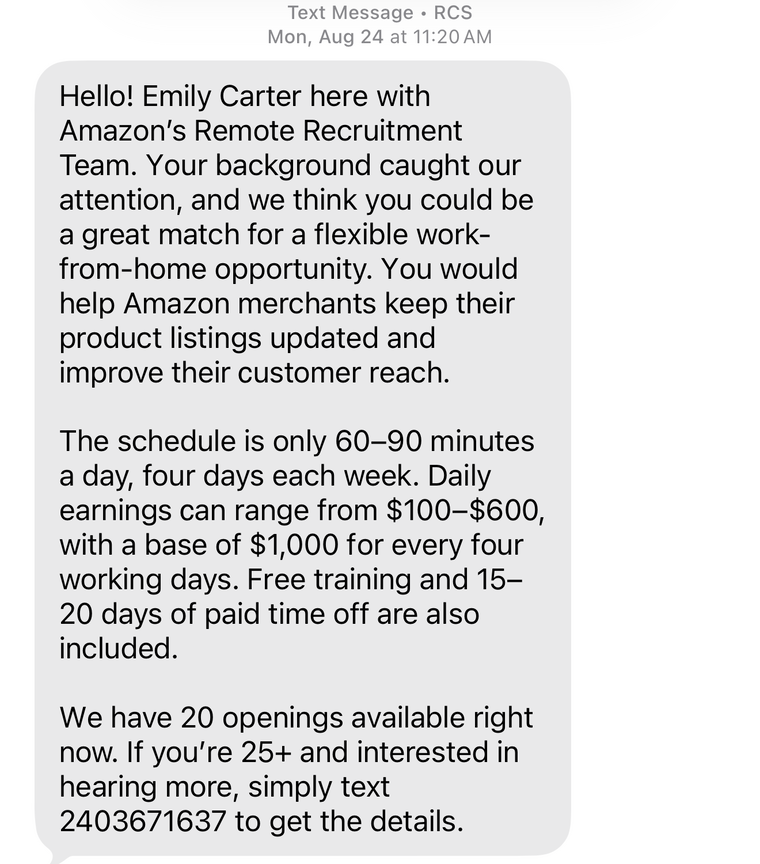
Verdict: Very likely a scam. A fake job “task scam.” You’re offered easy remote work, then told to deposit your own money to unlock your earnings.
- The sender doesn’t match who they claim to be. It says “Amazon’s Remote Recruitment Team” but came from a regular cell number. Amazon doesn’t recruit by text from a personal number.
- It pushes you to a different number: “simply text [another number] to get the details.” That moves you into a new conversation the first number can’t be traced to.
- Too good to be true: “60 to 90 minutes a day,” “$100 to $600 daily,” “a base of $1,000 for every four working days,” plus paid time off.
- Claims to know you, but generic: “Your background caught our attention,” with no name and nothing about your background.
I didn’t run these on camera, but the prompt knows every one of them, and so should you. Each has one tell that gives it away.
No shame. These are built to work on smart people in a hurry. In order:
- Clicked but typed nothing: close the page. That alone is usually low risk. Don’t go back.
- Entered card details: call the number on the back of your card right away. Ask the bank to cancel the card and send a new one. Watch your statements.
- Entered a password: change it on the real site, which you open yourself. Change it anywhere else you used the same one. Turn on two-step verification.
- Shared a one-time code: sign in to that account through its official app, change the password, and sign out all other devices.
- Report it: Gmail has Report phishing under the three dots. iPhone has Report Junk under a text. For money lost, search the FTC’s own site for its fraud reporting page.
This prompt is not foolproof. Scams change every week, and AI can be wrong in both directions. Use it to slow down and look closer, never to skip checking. If a message involves money, a code, or a login, verify it through a route you find yourself before you do anything.
- Federal Trade Commission, June 2026: about $16 billion reported lost to fraud in 2025, up about 25% from 2024; imposter scams $3.5 billion. ftc.gov
- The three examples are real messages from my own inbox and phone, checked in Claude on October 31, 2026. Verdicts and red flags are quoted from those checks.
Want more like this?
One simple AI win in your inbox every Sunday. No jargon, no overwhelm, unsubscribe whenever you like.
Want more like this?
Free AI guides added regularly. No jargon, no overwhelm.
kellystrattonai.com